A product URL becomes an email block
A product block inside a third-party email editor: mock data first, a wrap-once guard, a cookie-less request, an update loop and a context-aware inspector.
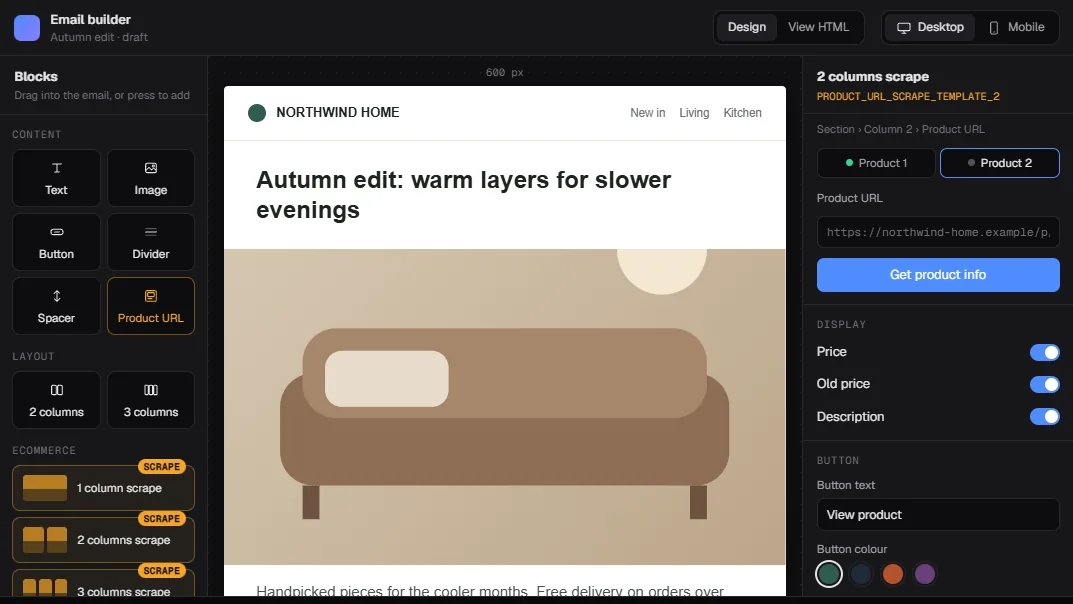
Putting a product into a campaign email used to mean copying it by hand. Open the product page, copy the title, copy the price, save the image, upload it, paste the link under a button. Then do it again for the next product.
And prices change. A wrong price in a sent email is a support ticket, and you can't unsend it.
So the request was simple: paste a product URL, get a ready product block. I built it between January and May 2026, as a new block for the drag-and-drop email builder in the Revotas panel.
The editor wasn't mine
The panel's email builder is an open-source React editor (Easy Email, which renders through MJML). It has its own block registry, its own inspector panels and its own drag and drop. Forking it would turn every upgrade into a merge.
So the block had to live entirely inside the extension points the editor already exposes:
- a block manager where you register new block types,
- a configuration manager that maps each block type to its inspector,
- category lists that decide what shows up in the palette.
The product data comes from a backend endpoint I didn't write. You give it a product URL and a brand, and it looks the URL up in that brand's product catalog and returns title, price, image and description. My side was everything in the browser.
By my last commit the block was about 1.8k lines across six files, and over 1,200 of those were the inspector.
Mock first, real API second
The first version (late January) was one block and a 148-line inspector. The second, in early February, added two- and three-column templates and ran entirely on mock data: a fake product page in the public folder and a small mock product module.
That was on purpose. I wanted the UX reviewed before any real data was involved. People could drag the block, paste a URL and see the fill while the real request was still being wired up.
Two weeks later I switched to the real endpoint and deleted the mock fallback in the same commit. Keeping it "just in case" felt risky. A silent fallback to fake data inside an email builder is how a placeholder product ends up in a real campaign.
The switch exposed things the mock never would. The endpoint returns an array of matches, and the code has to cope with an array, a plain object or a JSON string, with fields that can be spelled several ways (title or product_name, imageUrl or image_link). So there's a small unwrap step and a normalizer that maps every known spelling to five fields. If none of the five come back filled, it's treated as a failure and the user sees a message.
Wrapping someone else's inspector, exactly once
The interesting part of the editor is the inspector. When you click a column, the editor shows the column's settings. I wanted the product panel to appear under those settings for any column that holds a product.
The configuration manager lets you replace the inspector for a block type. So I read the original column inspector, wrapped it in a component that renders the original plus my panel, and registered the wrapper.
Two things needed care.
First, registration runs in an effect on the editor page, and that page mounts every time someone opens it. Without a guard, each mount would wrap the previous wrapper and stack another copy of the product panel. So there's a module-level isRegistered check, and a flag on the wrapper component itself. Before wrapping, the code checks whether the inspector it just read already carries the flag. If it does, it leaves it alone. The flag is the stronger guard, because it travels with the component.
Second, the editor's lookup doesn't always return a function. Depending on the block type it returns the component itself, or an object with a component or render field. My first version assumed a function, found nothing on some types, and those columns showed the wrong panel. A small resolver that checks all three shapes fixed the mismatch.
The cookie that broke the request
The panel and the scrape endpoint live on different origins. My first request sent credentials, because almost every other call in the panel does.
That couldn't work. The endpoint answers with a wildcard CORS origin, and browsers won't hand a credentialed response to the page under a wildcard. The endpoint doesn't need the session anyway: the brand id goes in as a query parameter. So the fix was one line, withCredentials: false.
The panel still checks that it knows the brand before it sends anything. No brand in the stored session means a clear "customer not found" message instead of a request that can't work.
The same week I replaced the URL check. The first version was a regex for http:// or https:// at the start. Now it goes through the URL constructor and accepts only those two protocols, so https:// followed by garbage no longer passes.
The block that kept writing to itself
Opening the inspector on a fresh product column fills in default values: an empty product, a default button text, enabled. The panel writes those into the block.
Writing to the block re-renders the inspector. The re-render saw the block, computed the defaults again (a new object, same contents) and wrote them again. A loop. It never crashed; it just kept writing the same values.
The fix was a comparison before every write. If the next value matches the current one field by field, skip the write. Fifteen lines.
An inspector that knows where it is
The block fills a column with ordinary editor blocks: an image, a text block with title, price and description, and a button linked to the product. That's deliberate. A marketer can change the font or the button color with the tools they already know.
It caused the last real bug. Once the column is filled, the user clicks the product image to change it. Now the image block is focused, the editor shows the image inspector, and the product panel disappears. To refetch or swap the URL you had to find and click the column itself.
The May release fixed that. Text and image inspectors are wrapped the same way as columns, and the panel walks up from the focused block to its parents. If any ancestor is a product block, or a column holding product data, the panel shows up with that column's data. A section with a single product column counts too.
Two smaller rules came with the April and May releases:
- Inputs are controlled, with a short 120 ms delay before each write, so typing doesn't push a block update per keystroke.
- The panel tracks whether you've edited the fetched content by hand. If you have, fetching again asks before replacing your edits.
Four variants, three categories
The palette ended up with four variants: the base block, plus one-, two- and three-product templates that create a section with equal columns and a product block in each. They sit in three palette categories, Content, Layout and Ecommerce, with custom preview tiles in Ecommerce.
An empty product block shows a shimmer placeholder in the editor ("Product card will appear here") and renders nothing in the exported email. A half-built block never ships.
What I'd do differently
I'd write down the editor's extension contract before the first line. The registration mismatch came straight from guessing what the configuration manager returns.
And I'd build a fixture of awkward layouts early: a product column inside a section inside a wrapper, a column with a manually edited image. The update loop and the vanishing panel would have shown up in the first weeks instead of months later.
Two colleagues later built on it. One replaced the text inspector with an HTML-mode editor, and because my code wraps whatever inspector is registered at that moment, it only needed the right call order. Another added a picker for alternate product images. Neither touched my registration code, and that's the part I'm happiest about.
Try the interactive demo. It runs on synthetic products, and one link fails on purpose. More of my work is on the Revotas page.
Notes on this post
Join in
Loading…
Leave a comment.
Sign in to add your note to this post.
Only your name and avatar are used.