A results page on someone else's storefront
One script that renders search results inside stores we do not host: what moved into a per-store config, how it mounts, and why old and new run side by side.
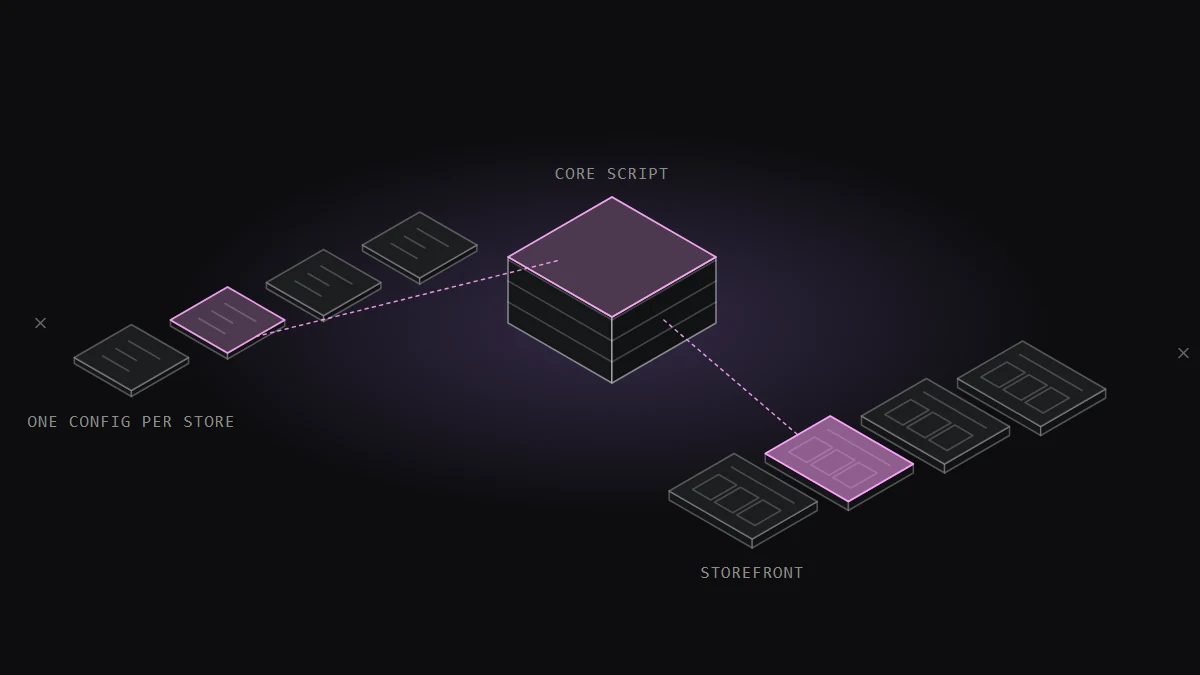
A store's search results page is the store's own page. Its header, its footer, its URL format, its stylesheet, its scripts.
In July 2025 I started building a results page that Revotas could put inside that page, on stores we don't host and can't deploy to. Product grid, filters, sorting, pagination, suggested searches, add to cart, all from one script tag.
The first version worked on one store. This is about what it took to make it work on the tenth without copying the code ten times.
One day to a page, three months to a product
The first commits are all from July 28, 2025. By the end of that day there was a results layout, a product grid, a filter sidebar and a test mode.
A month later it read real data. On August 25 I connected the search API and pagination. The next day I moved filtering into the browser, and on September 1 I fixed how price works when a product has both a list price and a sale price.
Then came the part nobody sees. From October to December the work was almost entirely about one question: what changes between stores, and where does that live?
The record for these files is 80 commits between July 28, 2025 and March 2026, all mine. The page script is 9,613 lines with 154 functions. The script that takes over the store's search box is another 4,099.
A fork per store doesn't scale
The second store had a different search URL. The third kept its results in a different container. Each one had its own colours, its own font, its own idea of which filters matter.
The quick way to handle that is to copy the script and edit it. That is how it started, and the cost showed up immediately: a fix in one copy had to be made again in the other.
On October 22 I pulled everything store-specific out into a single config object that the store's snippet defines before the script loads. The script itself stopped knowing anything about any store.
The config holds what actually differs:
- Site and URL format. The base URL, the search path and the name of the query parameter. One store searches with
/search?q=, another with a path and a differently named parameter. - Where to mount. A CSS selector for the target and an insert mode: before it, after it, or replace it.
- Filters and sorting. Which filter sections appear and which sort options are offered.
- Theme. Colours, font families, weights and sizes, and a z-index base with offsets for stores whose header sits on top of everything.
- Text. Every label and message, so a store in another language is a config change.
Every read goes through one helper that takes a path and a fallback. A store that sets nothing still gets a working page.
The repository now holds configs for ten stores. The file that a new store starts from is 639 lines, and it opens with a setup guide written as comments: the settings you must change, the ones you may change, and the steps in order.
Mounting inside a page I don't control
The page has to appear where the store's own results would have been. On some stores that element exists when my script runs. On others it arrives later, rendered by the store's own JavaScript.
So mounting is a small state machine. If the target is there, apply the insert mode. If it isn't, watch the DOM for it with a timeout, and attach when it arrives. In replace mode the new container takes over the target's attributes, because the store's stylesheet is often keyed to that element's id.
A loading screen covers the swap. It closes when the layout reports ready, and a guard timer closes it after 10 seconds no matter what. A loader that never goes away is worse than a page that pops in.
URLs were the bug factory
Most of the defects in the first months were about URLs.
The worst one produced addresses with the domain in them twice. A store's config had a base URL with a protocol, the search path came from somewhere else with its own host, and joining them gave a link that looked almost right. On November 3 I added helpers that normalize the base URL and the search path separately and strip a duplicated domain before anything is built from them.
Three days later I changed how suggested searches navigate. They had been swapping the page in place with pushState and a fetch. I replaced that with a full navigation to the normalized search URL, and added a flag a store can set to force full navigations everywhere.
Old and new on the same store
A store can't switch its results page blind. So the snippet loads conditionally.
A URL marker turns the new page on. With the marker, the visitor gets the new results page. Without it, the store's existing search runs exactly as before. Both live in the same snippet on the same production site, and the team can compare them on real queries.
Going live is one line: set the marker to an empty string.
Filtering in the browser, and its limit
Colour and price filters run in the browser against the products already loaded, debounced so typing a price doesn't redraw the grid on every key. No request per click.
Price uses the sale price first and falls back to the list price. A product with neither is left out of a price-filtered result instead of being treated as zero.
Starting a new search clears the active filters. Repeating the same search keeps them. The script tells the two apart, because carrying "red, under 500" from one query into an unrelated one returns nothing and looks broken.
The limit is plain: a browser-side filter only sees what was fetched. That is why the brand filter works differently. Choosing brands fetches every page for those brands and merges the products before filtering.
What I'd keep
- Decide early what varies. The config schema was the real design work. Once it existed, a new store became a file instead of a branch.
- Give every setting a default. A missing key should degrade to something sensible, never to an exception on someone's storefront.
- Write the setup guide where the settings are. The person adding a store has the config open, not a wiki.
- Ship old and new together. A switch in the URL made every rollout reversible by deleting one string.

Notes on this post
Join in
Loading…
Leave a comment.
Sign in to add your note to this post.
Only your name and avatar are used.