The push that opens the right screen
React Native push taps arrive through three different APIs. One router, payload normalisation, token care, and a backend debug that went wrong.
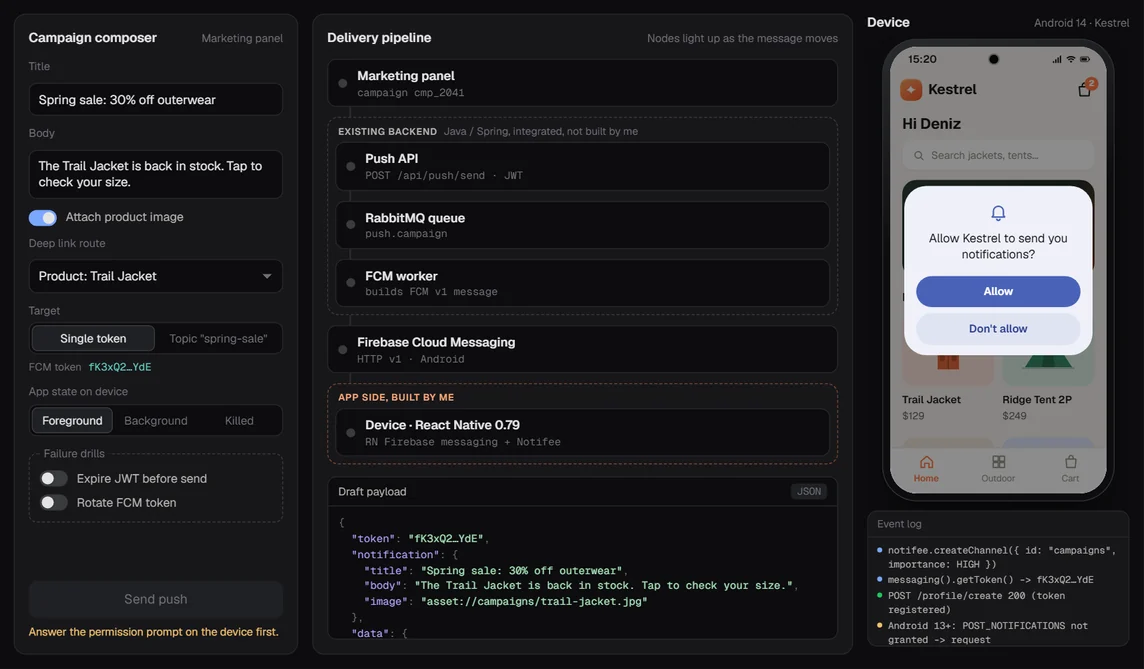
A push that says "your cart is waiting" and then opens the home screen is a broken push. The user tapped because they wanted the cart. The app shrugged.
That was my job on the mobile side of push at Revotas: when someone taps a notification, land them on the screen the campaign meant. Home, Category, Product or Cart. I built it as React Native reference apps (0.77 first, then 0.79.2) on @react-native-firebase/messaging and Notifee, so app teams had working code to copy instead of a spec to interpret. 25 commits, Feb 2025 to Mar 2026.
A tap is three problems
The tap reaches your code through a different door depending on what the app was doing when it arrived.
- Foreground. FCM hands you the message in
onMessage, and Android shows nothing on its own. If you want a banner, you draw it yourself (I used Notifee), and the tap comes back later as a Notifee press event. - Background. The system draws the notification. The tap shows up in
onNotificationOpenedApp. - Killed. The app boots from zero, and you have to ask
getInitialNotification()early, once, to find out a tap started it.
Then there's a fourth door. A press on a Notifee notification while the app is in the background fires in a headless JS context. There's no React tree there, so there's nothing to navigate.
And the server side belonged to someone else: an existing Java/Spring service that publishes to RabbitMQ, with a worker that calls FCM. I could read it. I didn't write it, and redesigning it was out of scope.
One router behind every door
The tempting version puts a bit of routing inside each listener. I didn't want five slightly different copies of the same if-else, so every entry point does two things: normalise the payload, then call one function.
routeFromNotificationTap(normalized, 'open'); // or 'initial', 'foreground'The source label only exists for the debug panel. The function builds a key from the route, click action, trace id, package id, title and body, and if it matches the last tap it handled, it stops. On a cold start two libraries can each report "the notification that launched you", and I didn't want the user bounced to the same screen twice.
The headless door got its own trick. The background press handler in index.js writes the payload to AsyncStorage under a pending key and does nothing else. The app reads that key on mount and again every time AppState turns active. It deletes the key first, then routes. If routing ever throws, the next launch starts clean instead of replaying the same bad payload forever.
Normalise before you route
The payloads didn't agree with each other. Title sometimes sat in the notification block, sometimes in data. dataMap came as an object or as a JSON string (FCM data values are strings, so that one keeps happening). Some senders used click_action, others clickAction. Some nested the useful part under extra or payloadJson.
So payload.ts (218 lines) flattens all of it into one shape: title, body, image, sound, click action, route, screen, plus the merged data and dataMap. It never throws. Bad JSON becomes an empty object and the app carries on.
Route resolution then runs in a fixed order:
- An explicit
routeorscreenfield wins. - Otherwise map the click action (
OPEN_PRODUCTbecomes Product,OPEN_CARTbecomes Cart, and so on). - Otherwise guess from ids: a
productIdmeans Product, acategoryIdmeans Category, acartIdmeans Cart. - Otherwise return
null.
null is a real answer. The app stays where it is and the debug panel says "route not resolved". I'd rather show that than open a random screen and pretend.
Tokens and the Android 13 prompt
Android 13 (API 33) made POST_NOTIFICATIONS a runtime permission. Skip the prompt and nothing crashes; the notifications just never appear. That's the worst kind of bug because every log looks healthy.
So the bootstrap asks for that permission first and stops with a visible status if it's denied. Then it creates a high-importance Android channel for the foreground banners, registers with FCM, gets the token and shows it in the panel with a copy button. The token goes to the backend in the profile call, and an onTokenRefresh listener picks up new ones, because tokens do change (a reinstall or cleared app data is enough).
401 means log in once more
The push API used JWT. Every call goes through one small post() wrapper. If the response is 401, it drops the cached token, logs in again and retries. Exactly once.
A second 401 is a real problem, and it goes back to the caller as is. A loop there would just hammer the login endpoint with a config that's never going to work.
Debugging a backend I didn't write
This is the part I learned the most from, partly because I got it wrong.
The gateway returned 200 and nothing reached the phone. A 200 only told me the request was accepted. So I traced the chain at class level, from controller to service to producer to RabbitMQ to the consumer to the FCM sender. I checked that the exchange-to-queue binding the consumer listened on actually existed (it did). I polled the queue during test sends. I still couldn't tie a specific send to a specific publish inside the test window.
What I wanted was trace-id logging in the controller, the service and the producer. And here's the mistake: instead of building the service from source, I hand-patched classes into the existing jar. It died at startup with a NoClassDefFoundError for a DTO class it needed.
I restored the old jar, started it again and checked it answered 200 before touching anything else. Then I wrote the rule into the handoff doc in plain words: a full build from source, or nothing. No hand-patched jars on a running service.
While that was going on, I made the app testable without the backend at all. The debug panel shows the raw payload, the normalised payload and the route result side by side. Mock payloads and a local test notification exercise the full tap path. Two PowerShell scripts send a real push by token or by topic. I also wrote down what a local notification proves (the app side) and what it doesn't (the server chain), so a green local test wouldn't get read as end-to-end. The backend team got a checklist, and the full end-to-end run passed when it was tested later.
What I'd do differently
I'd start from the source repo on day one. A hand-patched jar looked like the quick path, and it took the service down until I rolled it back.
I'd ask for a message id on every push. The dedupe key falls back to title and body when there's no trace id, so two campaigns with the same text could collapse into one tap.
The reference app switches screens with plain state. In a store app I'd map the same PushRoute values onto the navigation library's linking config, so a push and a deep link land through the same code.
And payload.ts is pure, which makes it the easiest thing in the project to test. The weird payloads I captured in the debug panel belong in fixture tests, so the next sender who invents a new field name breaks a test before it breaks a tap.
A tap is a promise the campaign made. The app's job is to keep it, in all three states.
More of my Revotas work is at /work/revotas/.
Notes on this post
Join in
Loading…
Leave a comment.
Sign in to add your note to this post.
Only your name and avatar are used.