Same model, different workflow
The written version of a session I gave my team on fixing bugs with an AI assistant: four steps, a context budget, the limits, and the demo I staged on purpose.
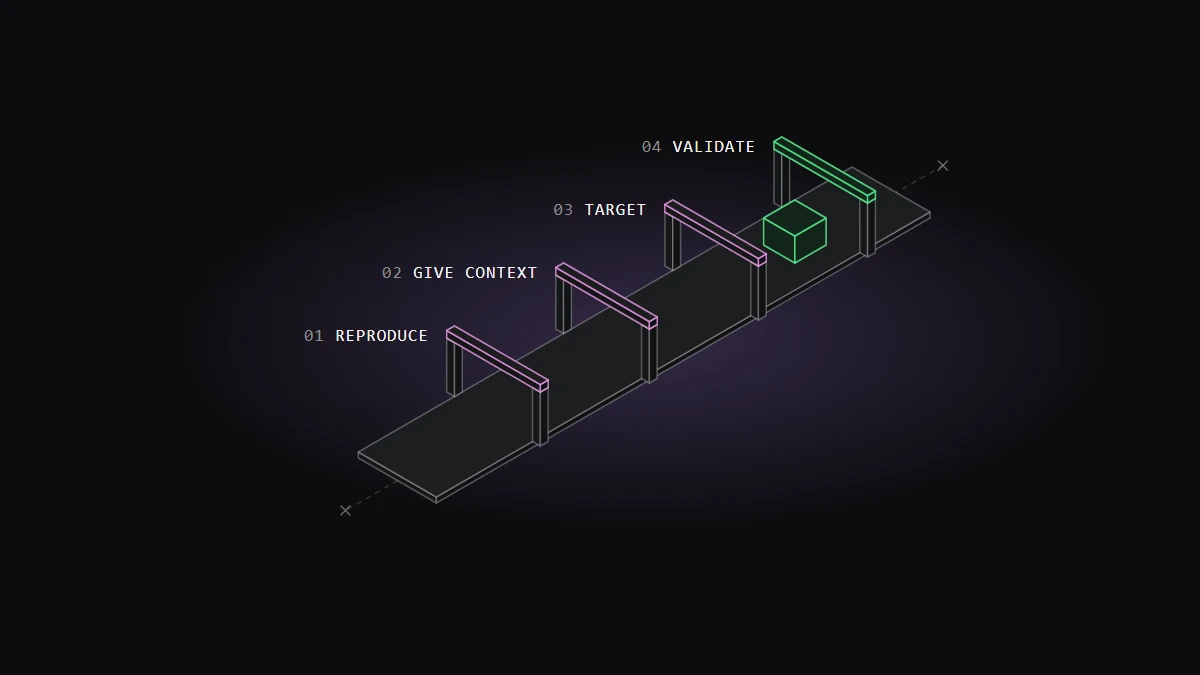
In June 2026 I gave a session to my team at Revotas on fixing bugs with an AI assistant. Eight numbered slides and one live demo.
The whole session hangs on one claim: the assistant doesn't find the bug. You direct it, it analyses, you verify.
This is the written version, including the part of the demo I staged.
The demo: one app, four bugs
The demo is a todo app in React, TypeScript and Vite, about a hundred lines in one component. There are three copies of it: two broken ones that start identical, and a working reference.
The broken copies share four bugs, chosen because each is a pattern every React developer has shipped at least once:
| Bug | Where | What you see |
|---|---|---|
| Stale closure | an effect with an empty dependency array | the active counter never updates |
| State mutation | toggle and delete change the array in place | clicking does nothing |
| Index as key | the list uses key={index} |
deleting updates the wrong row |
| Swapped filter | "active" and "completed" conditions reversed | each filter shows the other list |
The mutation bug is the instructive one. The code changes the data correctly and then hands React the same array it already had:
const toggleTodo = (id: number) => {
  const next = todos;
  const target = next.find((todo) => todo.id === id);
  if (target) {
    target.completed = !target.completed;
  }
  setTodos(next);
};
Same reference, so no re-render. The state is right and the screen is wrong, which is the kind of bug where a vague question gets a vague answer.
Two prompts
The first copy gets this:
fix the bugsThe second copy gets a prompt with five parts, and each part is there for a reason:
- Scope. The buggy code is in one file. Don't touch anything else. I name the path instead of handing over the repository.
- Analysis before edits. List every bug you find, the function it's in, why it's a bug and the exact fix you propose. I want to read the reasoning before anything changes.
- Where to look. Check for state mutations, effect dependency issues, index keys and filter conditions that may be swapped. I know these patterns, so I point at them instead of making it guess.
- Targeted fixes only. Don't rewrite the file. A rewrite can break the parts that work.
- A summary to review. Say what changed and why, so I can check it before I trust it.
On screen, the first copy ends with a one-line "fixed the bugs" and an app that is still broken: one bug gone, three left. The second ends with four explained fixes and a working app.
Same assistant, same model. The only difference is the workflow.
The part I staged
That contrast is scripted, and I'd rather say so here than let the demo imply more than it shows.
Each demo folder has an instruction file that fixes the outcome. In the "bad" folder it tells the assistant to repair only the swapped filter, skip the rest and answer in two overconfident lines. In the "good" folder it tells it to fix all four with targeted edits and explain each one.
I did it because a live model doesn't fail on cue. On an app this small, a current model can find all four bugs from three words, and a demo that depends on a model having a bad day isn't a demo.
So the todo app is not the evidence. What it does is make a failure visible in a couple of minutes that otherwise takes a real codebase and a real afternoon: a vague request against a large, unfamiliar system, where the assistant fixes the bug it noticed, reports success, and the confident summary gets merged.
Four steps
The process I taught is four steps:
- Reproduce. See the bug yourself and know when it happens. If you can't trigger it, you can't tell whether a fix worked.
- Give context. The relevant file or function, not the whole repository.
- Target. Tell it which kinds of error to look for. Don't make it guess.
- Validate. Run it, test it, read the diff. Never accept it blind.
The fourth is the one people skip, and I have skipped it. Once I committed without validating, and wrong logic went to production. That is where "no commit without validation" comes from.
Context is a budget
A slide in the middle says: tokens are cost, speed and quality.
The first two are obvious. More context costs more and takes longer. The third is the one that changes behaviour: unneeded context makes the result worse. The assistant spreads its attention across everything you gave it, relevant or not.
The rules I gave the team:
- Give only the file that matters.
- One problem at a time.
- Ask for a targeted fix, not a long answer.
- Never say "rewrite the whole file" unless that is what you want.
- When a conversation gets long, start a new one.
What it can't do
One slide lists limits, because a session that only sells is not useful to engineers:
- It won't always find the real root cause.
- It doesn't know what the business logic should be.
- It can't choose which fix suits the architecture.
- It can't say "it works" without running anything.
The assistant does the applying. The deciding stays with you.
What I asked the team to do
The session ended with a habit instead of a tool list: fix one bug a day this way. Small context, named patterns, and a validation step every time.
It works like a muscle. The four steps are easy to agree with on a slide and hard to follow under a deadline. Repetition on small bugs is what makes it automatic on the big ones.
Notes on this post
Join in
Loading…
Leave a comment.
Sign in to add your note to this post.
Only your name and avatar are used.