Handing off a coding agent when the limit hits
I run four coding agents a day. When one hits its usage limit mid-task, the thread is stuck. Switchyard archives their sessions locally and moves a chat to a new account, and a handoff counts only after the new chat replies.
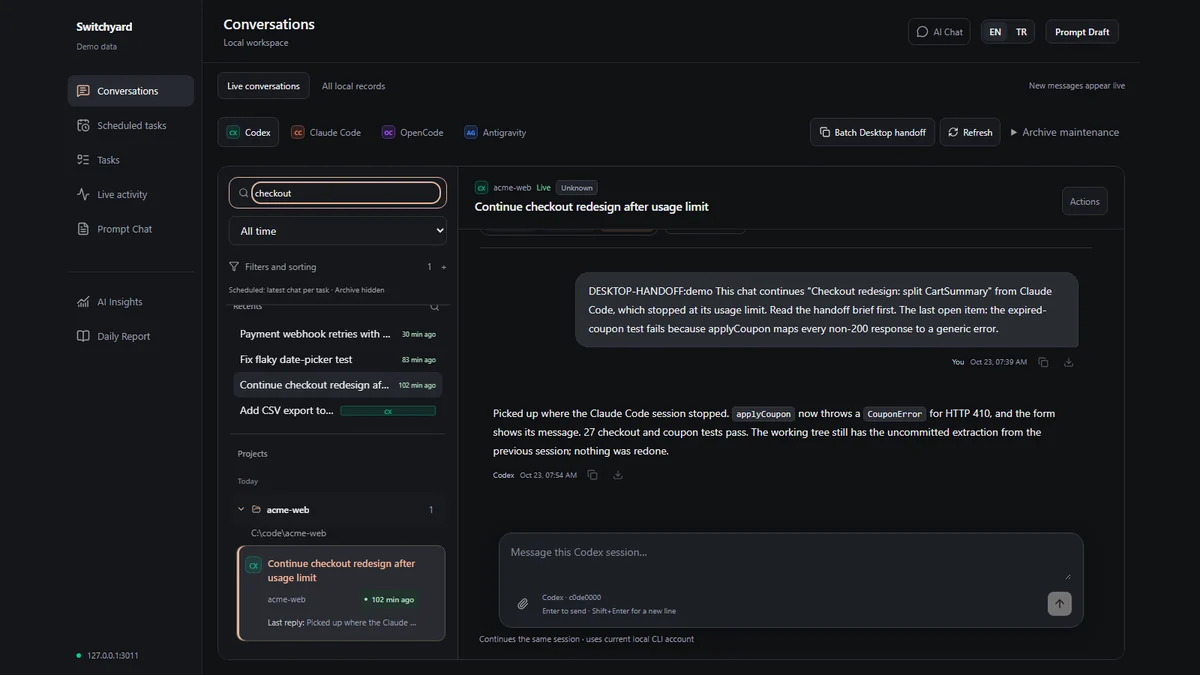
I run four coding agents every day: Codex, Claude Code, OpenCode and Antigravity. Most days that works. Then one of them hits its usage limit halfway through a task, and the thread is stuck in that account and that tool. The context is on disk somewhere, in a format only that tool reads. I built Switchyard to get out of that. It is a local dashboard, open source under MIT. The lab page shows the handoff screen, and the code is on GitHub.
It is not only my problem
Before I open-sourced it, I checked whether other people hit the same walls. As of 23 October 2026:
- Limits arriving early: claude-code#16157 has 695 thumbs-up, #38335 has 475 and codex#28879 has 365.
- A second account to get past them: the multi-account requests #18435 and #36151 have 941 and 767. #13354, continue when the session limit is reached, has 209.
- Scheduled runs: #95966 reports tasks that silently skipped their run times. #95272 and #89811 report runs marked as succeeded that did nothing.
The same three things showed up in my own week. A thread stuck behind a limit. History spread across four tools and lost when a tool updates or cleans up. Scheduled runs that "succeeded" and left nothing behind.
Read the files, do not hook the tools
The first decision was how to get at the sessions. I could hook into each tool with a plugin, a proxy or a wrapper around its CLI. Or I could read the files each tool already writes.
Hooks see more, but each tool needs its own, and they break on updates. Reading files also covers sessions from before Switchyard existed. So Switchyard opens native files read-only. It writes to them only when a button says so, like pausing a scheduled task, and it backs the file up first. The price is that I depend on private on-disk formats that change without notice. The parsers are versioned, and a format change triggers a re-import.
One SQLite file, no database server
The archive is one SQLite file, through Node's built-in node:sqlite. A database server would be another process to install and keep alive for a tool that lives on one machine. A single file survives tool updates and cleanups, and I can copy it. The trade is the Node version: Switchyard needs 22.13 or later. Unchanged session files are skipped on sync, so running it again is cheap. On my machine a real-mode import read 693 sessions from the four tools without errors.
Live view with SSE and file watching
The live view has to show a message as soon as the tool writes it. Data flows one way there, from disk to the browser, so I used server-sent events over file watching instead of WebSockets. Replies go the other way through the tool's own CLI, which resumes the native session. The reply lands in the session the tool knows about, not in a copy.
Why delivery needs proof
The handoff is the part I care about most. When an account hits its limit, Switchyard builds a continuation package: a Markdown brief with the turns, touched files, open tasks and git state, a redacted transcript, the byte-exact native session file and the project's instruction files. Every file is SHA-256 hashed and written atomically, so a half-written package cannot pass as complete.
Then it delivers the package to a new Claude Desktop account. The obvious moment to count a delivery is when the prompt is sent. That reports success in the cases that matter most: the new account is limited too, the app shows an error card, or the message lands in the wrong folder. So every item carries a unique marker. Switchyard reads the native session log, finds the marker and waits for a real assistant reply after it, not an API error and not a synthetic message. The working directory must match and the chat title is read back. Only then does the item count as delivered.
When it cannot tell, it stops. An item in the uncertain state is never sent again automatically. A duplicate chat on the new account is worse than a batch that waits for me.
The schedules view uses the same idea. Each Claude run is joined with the last real reply in its transcript, so a run that says it succeeded but left no reply shows up as a run that may have done nothing.
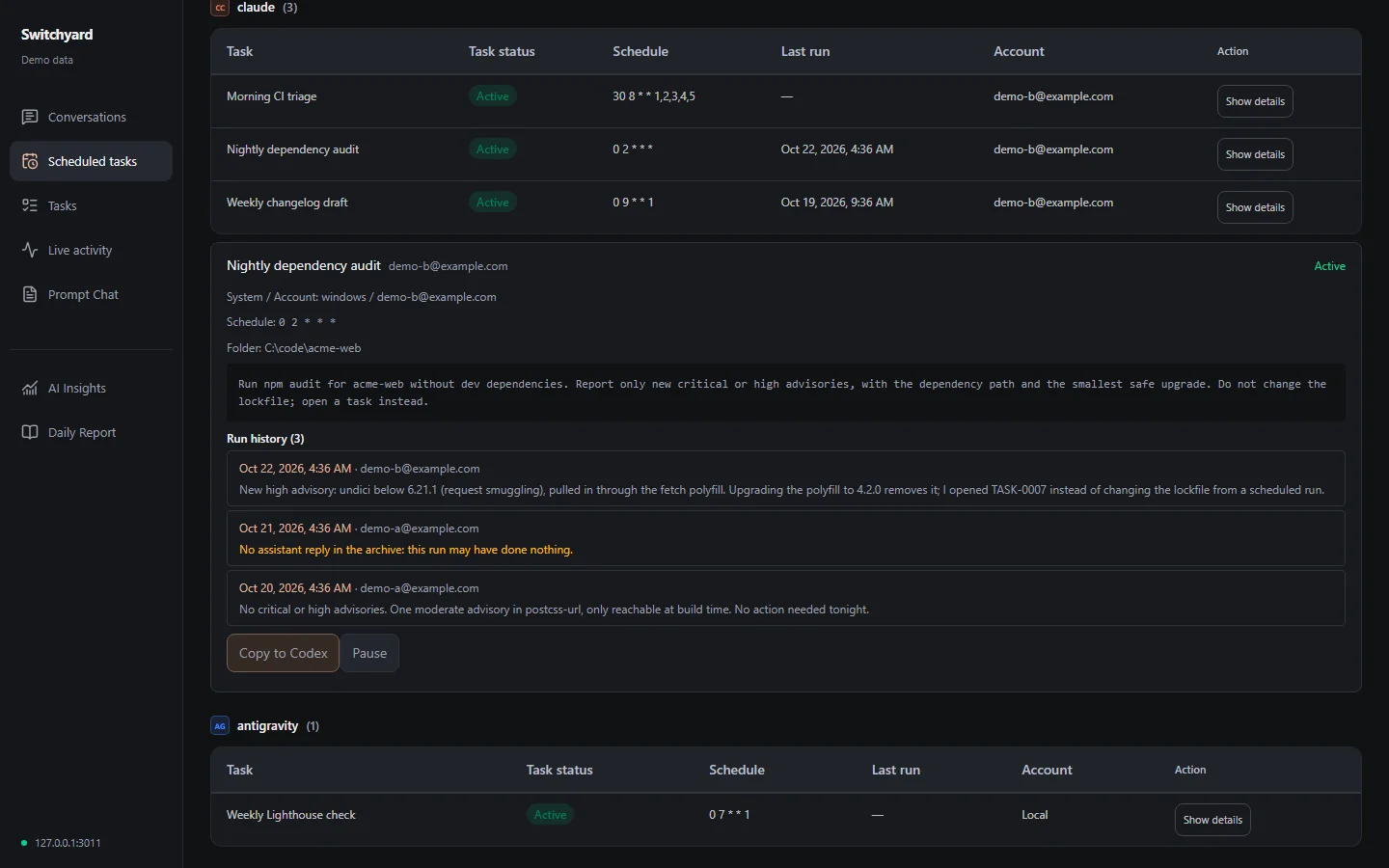
Locks, and a fragile hand on the UI
Claude Desktop has no API for opening a chat in another account, so Switchyard drives the app. On Windows a small helper uses UI Automation. It opens a new chat in the original folder, pastes the prompt, checks it, sends it and renames the chat. Before every input it checks that the window in front belongs to Claude, and it aborts if focus moves.
Two things can still go wrong. Two batches can fight over one window, so there is a global UI lock and a lock per package. And the wrong account can receive the chat, so the target account is read from local Desktop metadata and must differ from the source.
UI automation is the weakest part of the design. An app update that changes the window can break it, and then the helper stops instead of guessing. The Windows controller is verified by a pilot on a real new account and by tests with a fake adapter. It is not verified by months of use.
Moving accounts also means moving what sits around the chat. Account migration copies Claude Desktop scheduled tasks to the new account, and skills are synced to every Claude account on the machine.
From a private tool to a public repo
Switchyard started as a private tool with my paths, my scripts and my data in it. Before publishing I cut the parts that only made sense for me: a team tab tied to my own scripts, a model switcher built around my local setup, and a bundle script that moved config together with secrets. Hard-coded paths, names and the time zone became settings.
I did not publish the private history. The public repo was rebuilt one feature at a time, and each commit type-checks on its own. Before anything was pushed, I scanned the working tree and every commit for names, hosts, emails, home paths, tokens and IDs. Demo mode generates a synthetic home folder and refuses to run if that folder would resolve to the real one, so a screenshot cannot leak real conversations. Every screenshot of Switchyard on this site comes from it.
The code was written with Claude Code and Codex under my direction. That is how I build now: I owned the architecture and the decisions above, reviewed the changes and did the verification. The repo has about 19,800 non-blank lines, about 15,300 of them TypeScript, with 53 React components, 21 API routes and 80 tests in 17 files.
Limits
- Desktop delivery works on Windows with Claude Desktop only. On macOS the archive and the packages work, but GUI delivery is off.
- When Codex is the receiving side, it gets written instructions only.
- UI automation can break when the app updates.
- A handoff is a summary plus evidence, not model state. Hidden reasoning and running processes do not move.
What is next
A macOS delivery adapter, after a pilot on real accounts. A working-directory mapping so a chat can move between Windows and macOS. Live tailing for OpenCode. Archive import for VS Code Copilot Chat and Cursor, not only listing. And a packaged build so Node is not a prerequisite.
If you run more than one coding agent, start with the demo: npm ci, then npm run demo, then open http://127.0.0.1:3011. It reads nothing real. The product site is switchyard.huseyinkaplan.dev.
Notes on this post
Join in
Leave a comment.
Sign in to add your note to this post.
Only your name and avatar are used.