Email product block
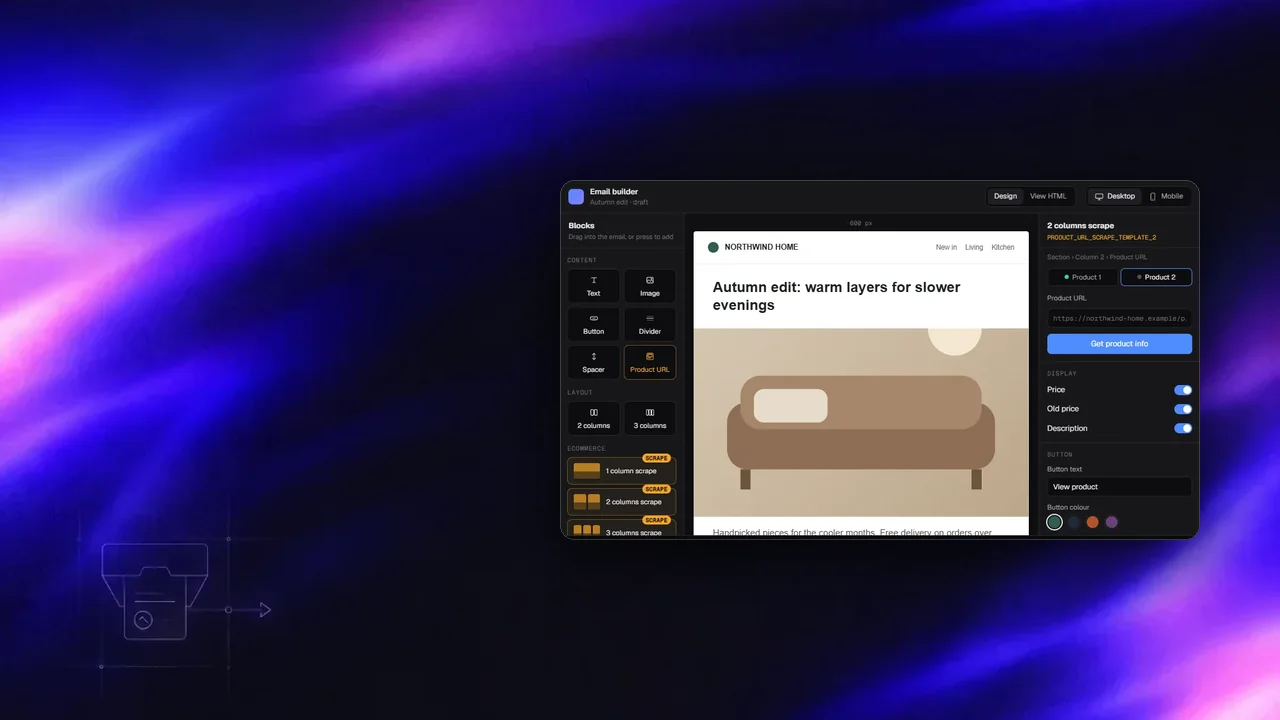
A block for the panel's drag-and-drop email builder. A marketer pastes a product URL and the block fills itself with the product's title, price, image and description, in a one-, two- or three-product layout.
- 4block variants
- 3builder categories
- ~1.8klines, built from scratch
- Jan–May2026
Build an email from product links
Drag a product block onto the email, pick a product URL and watch it fill. One of the links fails on purpose.
Problem
Putting a product into a campaign email meant copying its title, price and image by hand, one field at a time.
Prices change, images get re-uploaded, and a wrong price in an email is a support ticket. The email builder is a third-party editor with its own block and inspector system, so the new block had to fit its extension points rather than fork it.
My role
I created the block end to end: the base block and the one-, two- and three-product templates, their place in the Content, Layout and Ecommerce categories, and the inspector panel. I first built it against mock data, then switched it to the real scrape API and kept improving the editing flow over several releases.
From URL to email HTML
- BlockRegistered in the editor with four variants and default values.
- InspectorURL fields, visibility toggles, button and layout controls, aware of which block is selected.
- Scrape serviceExisting backend endpoint reads the product page.
- Fill + renderMapped into the block and exported as table-based email HTML.
Violet tint: parts I wrote.
What was hard and what I did
Extend the editor, don't fork it
The editor ships its own inspector components. I wrapped them through its configuration manager with a guard so they are wrapped only once, which fixed a registration mismatch that showed the wrong panel.
Mock first, real API second
The first branch ran on mock product data so the UX could be reviewed early. The second switched to the scrape API, fixed drag and drop, and stopped sending cookies on the cross-origin request.
No update loops
Default values written back into the block re-triggered the inspector, which wrote them again. The block now only writes values that actually changed.
Context-aware editing
Later releases made the inspector aware of where the block sits, so a product inside a two-column layout shows the controls that matter there.
Notes on this post
Join in
Leave a comment.
Sign in to add your note to this post.
Only your name and avatar are used.