Moving years of CRM history out of a legacy PHP panel
How I moved a legacy CRM into a new panel with scripts: dry-run reports, one log line per record, reruns that skip what worked, and dirty data kept visible.
The new CRM (customer records and their history) screens were done, and they were empty. Years of customer history still lived in an old PHP panel that the sales and account teams used every day. Nobody was going to switch to a new tool that didn't know their customers.
So I moved the data with scripts: customers first, then their notes, invoices, contacts and agreements with their document links. It went in small runs over several weeks, while both panels stayed in use.
This is how I did it, what broke, and what I'd change.
In short
- Every record went through the new backend's API, so the new panel's validation rules checked the old data.
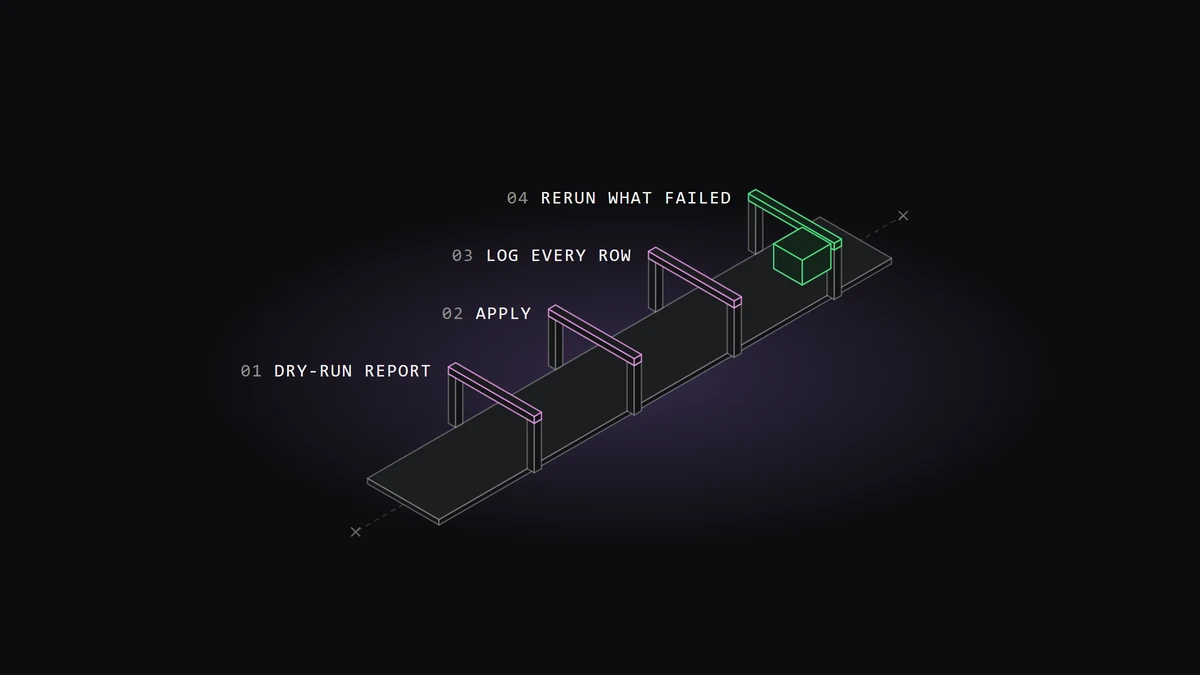
- Each script has a dry-run mode that writes a report before anything is sent.
- One log line per record makes reruns and rollbacks exact.
- Dirty data is fixed or given a placeholder, never dropped, and the record says what changed.
The constraints
The old side was a database the scripts could only read and export. The notes table alone was too big for one request, so the export went page by page.
On the new side, I didn't write to the database at all. Every record went in through the new backend's API (the door other software uses to read and write data), the same one the panel uses. That was a choice, and I'll come back to it.
The data was real customer data. And the teams kept working in the old panel during the move, so new rows kept arriving after the first run.
Decision 1: go through the API, not the database
Writing straight into the new tables would have been faster. It would also have skipped every rule the backend checks: required fields, valid emails, people who must have an active account, status codes that must exist.
If my rows broke those rules, the panel would break later, on a screen, in front of a user. So I let the API reject my data first.
It rejected a lot. That was the point. Every rejection was a rule I would otherwise have found in production.
The cost was that the API had opinions. It set the creation date of notes, invoices and contracts to "now", whatever I sent. A note written years ago would show up as written yesterday.
So the original date went into the record itself. Notes start with the old date in brackets, and invoices and agreements carry a line with the original date. Contracts were stranger: the start date was ignored on create but accepted on update. So agreements went in with a create pass, then a second update pass to set their real dates.
Decision 2: every script has four modes
Each import script runs as dry-run, apply, update or rollback.
Dry-run is the default. It sends nothing. It builds every payload (the data each request carries) and writes a report. The report says how many rows will go and how many will be skipped. It lists people who match no one in the new system, statuses with no equivalent, and customers that share an ID.
I read that report before every real run. Most of my decisions came from it.
Apply sends the records. Update refreshes records that already moved, using the same mapping, so a fix in the mapping can reach old rows too. Rollback deletes what a run created.
Decision 3: one log line per record
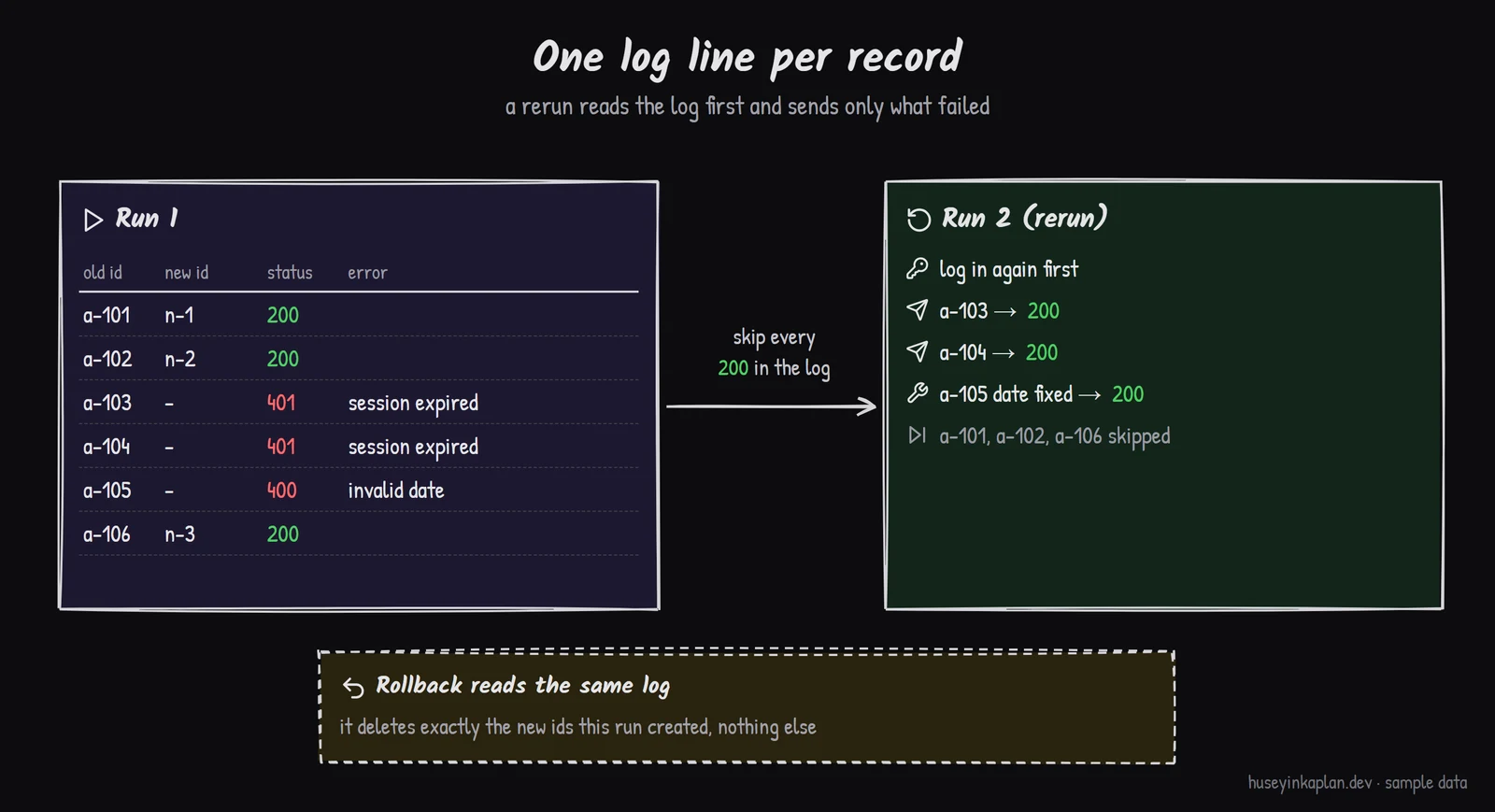
Every request writes one line to a log file: the old ID, the new ID, the HTTP status and the error if there was one.
That log made the whole thing safe to repeat. A rerun reads it first and skips everything that already succeeded. Rollback reads it to know exactly what to delete. Nothing depends on my memory.
It paid off fast. Sessions expire, and a long run outlives its token. On the biggest runs, requests started coming back unauthorized halfway through.
Nothing was lost. The log knew which rows had failed, and the next run sent only those. After that I added an automatic login retry, so a run now renews its session and keeps going.
Decision 4: parents first, then children by mapping
Customers moved first. Each new customer record kept the old panel's ID in its own field.
Then notes, contacts, invoices and agreements moved. In the old panel they pointed to the old customer ID. The script built a map from old ID to new customer and sent each child under the right parent. A child whose parent hadn't moved was skipped and counted, never guessed.
Linking customers had its own problem. Some old customers had no link to their account in the main platform. I matched them by name, after normalizing both sides: Turkish letters folded to plain ones, legal suffixes like "A.Ş." and "Ltd." removed, punctuation stripped.
Matching by name has false positives, so the report listed every group of records that ended up on the same ID. Some were real (an agency running several brands), some were duplicates, and a person checked them.
Decision 5: dirty data stays visible
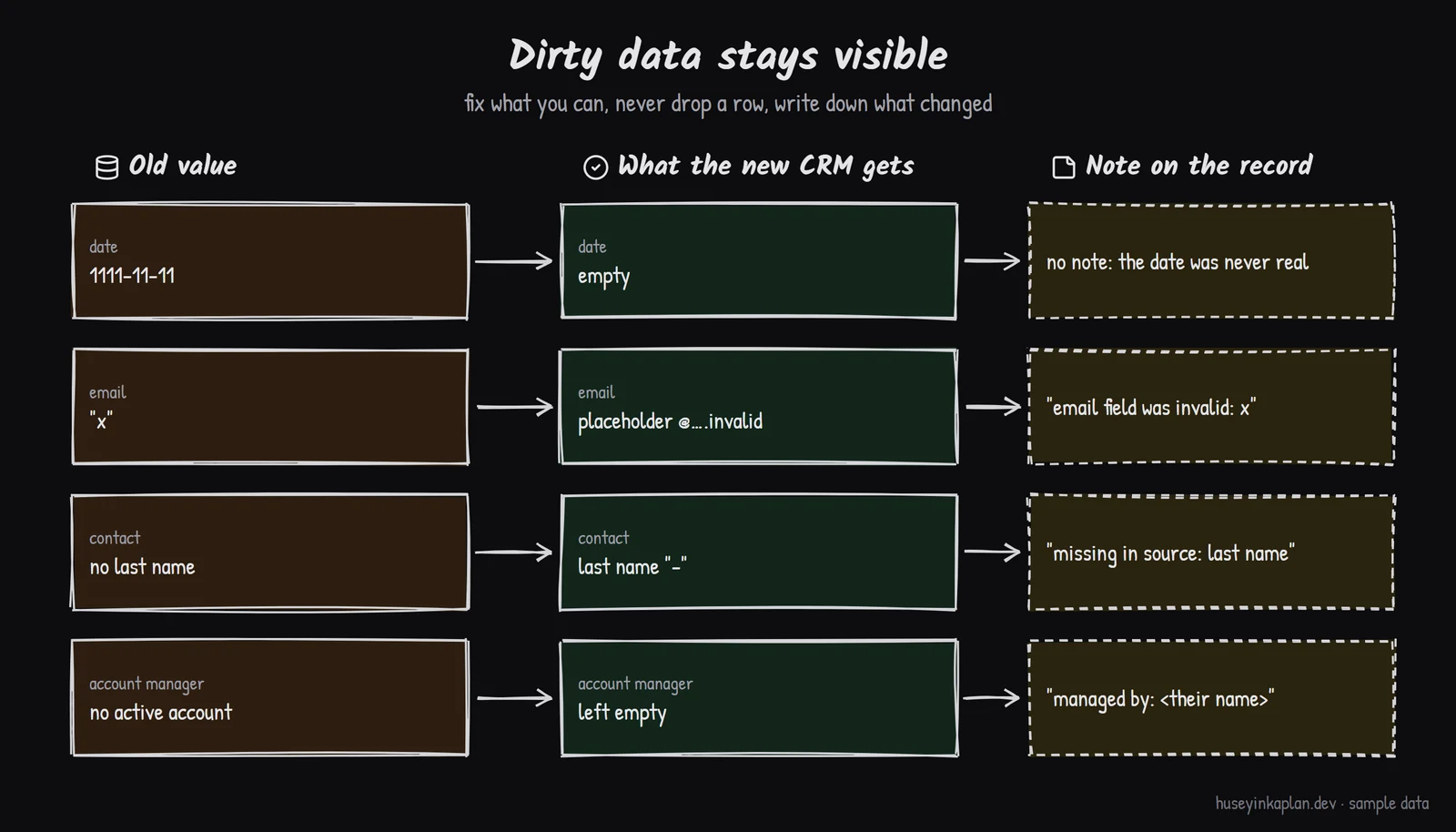
Old data is messy in ways you only see row by row. My rule was simple: don't drop a record and don't hide a problem. Fix what I can, and write down what I changed inside the record.
Dates were the first fight. The old database had values like 1111-11-11. The new database can't store dates before 1753, so a batch of contacts failed on the first run. Invalid dates now go in empty. "No date" in the old panel was often stored as 1 January 1970, so those became empty too.
Email fields were free text. I found "Name mail@company.com", addresses with a trailing semicolon, double dots in the domain, and values like "x". The script pulls a valid address out when there is one.
Some contacts were missing a first name, a last name or an email, and the backend requires all three. Dropping them would have lost real people. So they got a placeholder, and the email uses the reserved ".invalid" domain, which can never receive mail. Their notes say what was missing and what the old value was.
People were another gap. Some names on old records had no active account in the new system, and the backend only accepts active ones. Those names went into a notes block on the customer, so the history still says who managed the account.
Decision 6: a mode for one customer
The first runs moved everything. After go-live, people still added a few records in the old panel for a while.
A full rerun would have touched every customer. So I added a flag that limits a run to one customer. It moves that customer's pending rows and leaves everyone else alone.
The bug the migration left behind
Child records pointed to the customer ID, and that ID is editable in the panel. When someone corrected a customer's ID, the notes, invoices, contacts and agreements stayed on the old number.
The panel now handles it. Changing a customer ID counts the records on the old number, asks for confirmation and moves them. The API wouldn't move a note to another customer, so notes are recreated under the new ID with their original date and author.
What I'd do differently
I'd agree on an import mode with the backend before the first run: one flag that keeps the dates I send. Half my special cases were working around "now".
I'd freeze the old panel on a fixed date. Two live panels for weeks meant extra runs and extra questions.
I'd check the documents earlier. Agreements link to files, and some file names in the old database had no file behind them. I found that after the agreements had moved, not before.
Questions people ask
Why write through the API instead of the database?
The API runs the same validation the new panel runs, so bad rows fail during the migration, not later in front of a user. The cost is that some fields, like creation dates, are set by the API, so original dates had to be stored inside the record.
How do you make a data migration safe to rerun?
Write one log line per record with the old ID, the new ID, the status and the error. A rerun reads the log first and skips everything that already succeeded, and a rollback reads the same log to delete only what that run created.
What should happen to dirty legacy data?
Do not drop the record. Fix what you can, use a clearly fake placeholder where the new system requires a value, and write the old value into a note on the record when it carries information.
How do child records find their new parent?
Move parents first and keep the old ID on each new parent record. Then build a map from old ID to new parent and send every child under the right one. A child whose parent has not moved is skipped and counted, never guessed.
Close
The scripts were not clever. They were boring on purpose: a dry-run report, one log line per record, and a rerun that skips what already worked. That's what let me move years of history while people were using both panels.
More production work is at /work/.
- In short
- The constraints
- Decision 1: go through the API, not the database
- Decision 2: every script has four modes
- Decision 3: one log line per record
- Decision 4: parents first, then children by mapping
- Decision 5: dirty data stays visible
- Decision 6: a mode for one customer
- The bug the migration left behind
- What I'd do differently
- Questions people ask
- Close


Notes on this post
Join in
Leave a comment.
Sign in to add your note to this post.
Only your name and avatar are used.